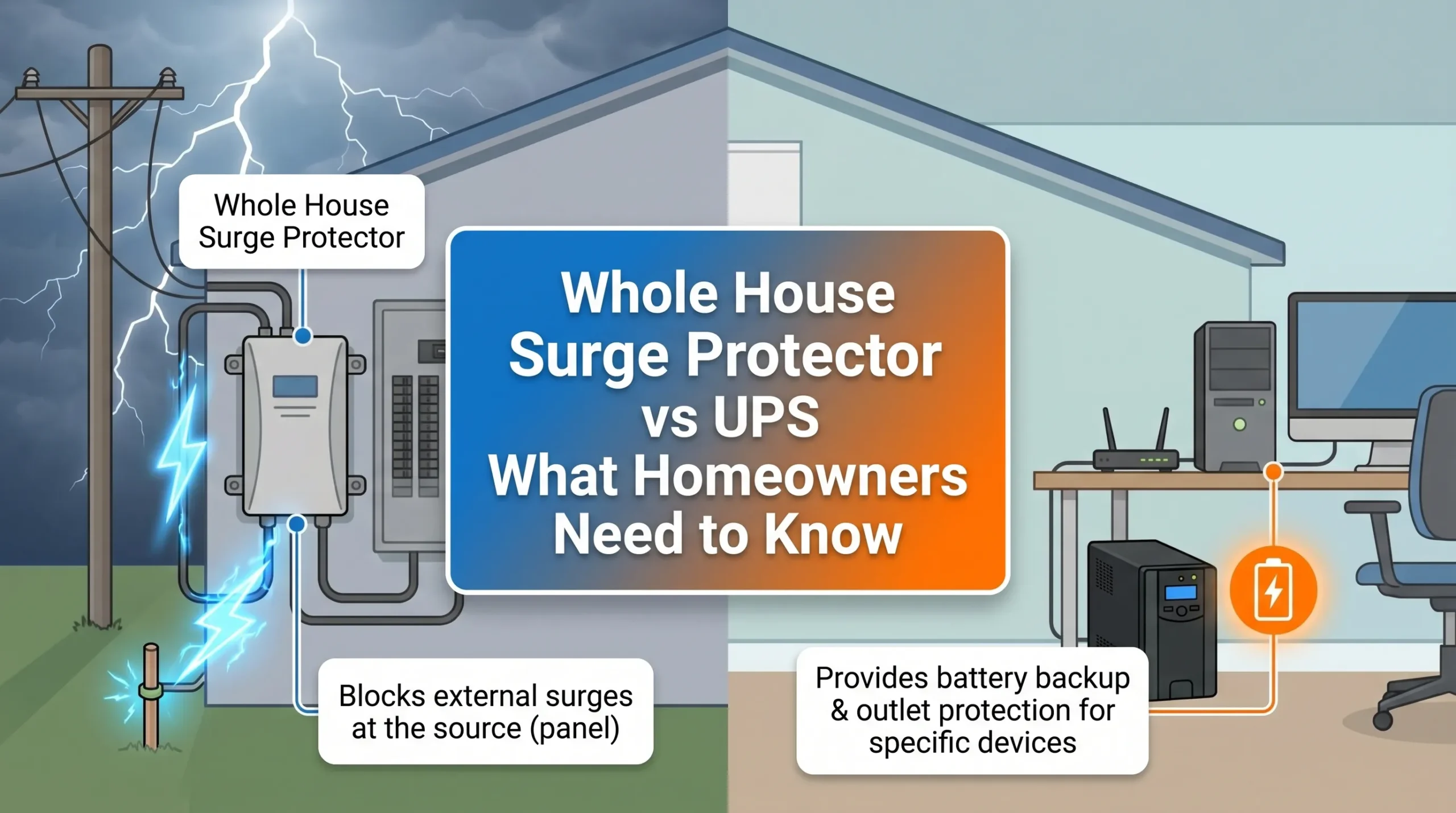
You want to protect your home from electrical threats like frequent surges, overloaded circuits, flickering lights, tripping breakers, and shocks. The question is simple: should you choose a whole house surge protector, a UPS, or both? The answer depends on the kind of protection you need. A whole house surge protector shields everything from sudden voltage spikes, while a UPS keeps your devices running during power outages.
Understanding the differences matters in 2026, as electrical threats are more common. You will find clear explanations here, making your choice between whole house surge protector vs UPS easy.
Whole House Surge Protector vs UPS: Quick Answer
You want to make the right choice for your home’s electrical safety. The debate between whole house surge protector vs ups can feel confusing, but you can break it down by looking at your specific surge protection needs. Each device serves a unique purpose. A whole house surge protector shields your entire home from dangerous surges, while a UPS (Uninterruptible Power Supply) keeps your most sensitive electronics running during power interruptions. You do not have to guess which one is best. You can match the right solution to your situation by understanding how each works and what they protect.
When a Whole House Surge Protector Is Enough
You can rely on a whole house surge protector if you want broad surge protection for your entire home. This device works at your main electrical panel and stops voltage spikes before they reach your appliances and electronics. You should consider a whole house surge protector in these situations:
-
You want to protect all devices from both internal and external surges, including those caused by lightning or power grid issues.
-
You have hardwired appliances like HVAC systems, electric water heaters, or built-in ovens that cannot plug into power strips.
-
You want to prevent gradual damage from small, daily surges that can shorten the lifespan of your electronics.
-
You do not need backup power during outages, but you want to avoid costly repairs from surge damage.
-
You want a single solution that covers every outlet and device in your home.
A whole house surge protector gives you peace of mind by providing surge protection for everything connected to your electrical system. It is a smart investment if you want to extend the life of your appliances and electronics.
When a UPS Is Needed
You need a UPS when you want more than just surge protection. A UPS steps in when your home experiences power interruptions that can cause data loss or hardware failure. You should use a UPS in these scenarios:
-
Blackouts: You want your computers, routers, or security systems to keep running during a complete loss of power.
-
Power surges or spikes: You need to protect sensitive electronics from sudden voltage increases that can overheat and damage internal components.
-
Brownouts: You face extended drops in voltage, often lasting hours, and want to keep your devices safe and operational.
-
Sags: You experience short-term voltage drops that can cause computers to shut off or hardware to fail.
A UPS provides battery backup and surge protection for your most critical devices. You can avoid losing unsaved work, interrupted video calls, or security system failures by using a UPS where it matters most.
When to Use Both
You get the best protection when you combine a whole house surge protector with a UPS. This layered approach covers all your surge protection needs and keeps your home running smoothly. The table below shows how each device works together to protect your electronics:
|
Device |
Main Purpose |
Protects Against |
Best Use Case |
|---|---|---|---|
|
Surge Protector |
Limits short voltage spikes |
Transient surges from lightning, utility switching, or appliance loads |
TVs, computers, routers, home electronics |
|
UPS |
Provides backup power and voltage support |
Power outages, short interruptions, some voltage fluctuations |
PCs, servers, NAS systems, networking equipment |
When you use both, the whole house surge protector handles large external surges, while the UPS provides backup power and shields against short interruptions. This combination ensures your delicate electronics stay safe from surges that start inside or outside your home. You do not have to worry about losing data or replacing expensive devices. You get complete surge protection and peace of mind.
What Is a Whole House Surge Protector?
You want to keep your home safe from electrical threats. A whole house surge protector gives you a strong defense against sudden voltage spikes that can damage your electronics and appliances. You install this device at your main electrical panel. It stands guard over your entire electrical system, ready to act when a surge strikes.
What Devices Are Protected
You protect every device connected to your home’s electrical system with a whole house surge protector. This includes large appliances, like HVAC systems and refrigerators, and sensitive electronics, such as computers and smart TVs. Even small, daily surges from devices like air conditioners and copiers can degrade electronics over time.
A surge protector helps prevent this gradual damage, extending the life of your devices. You get peace of mind knowing that your home’s essential equipment stays safe from unexpected surges.
Installation and Cost
You should have a licensed electrician install your whole house surge protector. The device connects directly to your main electrical panel and monitors the flow of electricity entering your home. When a voltage spike occurs, the surge protector diverts the excess electricity away from your circuits and into the grounding wire. The average installation cost in 2026 ranges from $150 to $400 for labor, plus the price of the device. You should get three quotes from licensed electricians to ensure you receive fair pricing and quality service.
Most surge protectors come with a connected-equipment warranty, but you need a documented professional installation for the warranty to remain valid. Surge protectors have a limited lifespan. You should plan to replace them every 2- 3 years, especially after a major surge event, because their protective capacity can decrease even if they appear to work.
What Is a UPS?
You want to protect your devices from surge events and keep them running when the power supply fails. A UPS, or uninterruptible power supply, gives you backup power and surge protection for your most important electronics. You can rely on a UPS to maintain a steady power supply during outages, brownouts, or voltage fluctuations. You get peace of mind knowing your computers, routers, and security systems stay safe and operational.
How a UPS Works
A UPS constantly monitors the voltage from your main power supply. When the power supply becomes unstable or fails, the UPS automatically switches to its internal battery. You get backup power instantly, so your devices never lose connection. The UPS uses several components to manage surge events and keep your power supply stable:
-
The UPS monitors voltage and detects any surge or drop.
-
The battery supplies backup power during outages or fluctuations.
-
The rectifier converts AC power to DC, recharges the battery, and handles voltage changes without activating the battery.
-
The inverter converts DC back to AC, filters surge spikes, and ensures a stable output.
-
The automatic transfer switch moves power from the main supply to the UPS during outages, keeping your devices running.
You can trust a standard UPS to deliver surge protection and backup power without interruption.
Backup Power and Surge Protection
You need a UPS with surge protection to shield your devices from sudden voltage spikes and keep them powered during outages. The battery inside the UPS provides backup power, so you avoid losing unsaved work or interrupting important tasks. The inverter and rectifier filter surge events and maintain a steady power supply. You get reliable surge protection and backup for your computers, entertainment systems, and smart home devices.
Tip: Place your UPS with surge protection near your most sensitive electronics. You ensure maximum protection and uninterrupted power supply.
Types of UPS for Homes
You can choose from several types of standard UPS systems for your home:
-
Offline (Standby) UPS: This standard UPS offers basic surge protection and backup power for personal computers and small devices.
-
Line-Interactive UPS: You get automatic voltage regulation and surge protection. This standard UPS suits small server rooms and network closets.
-
Online (Double-Conversion) UPS: This standard UPS delivers the highest level of surge protection and backup power. You use it for critical devices that require uninterrupted power supply.
You select the UPS with surge protection that matches your needs and budget. You keep your home safe from surge events and power supply failures.
Whole House Surge Protector vs UPS: Key Differences
You want to make the best decision for your home’s power protection. Understanding the differences between a surge protector and a UPS helps you avoid costly mistakes and keeps your electronics safe. Many homeowners believe that one device can handle every electrical threat, but each device serves a unique purpose. You need to know how a surge protector and a UPS work together and where they differ. This knowledge gives you the confidence to protect your home from power surges, power outages, and sudden power outages.
A surge protector acts as your home’s shield against voltage spikes. When a power surge hits, the surge protector diverts the excess energy away from your devices. You protect everything from your refrigerator to your smart TV. You do not have to worry about lightning strikes or small, daily surges wearing down your appliances. The surge protector stands guard at your main panel, stopping damage before it starts.
A UPS, on the other hand, steps in when the lights go out. You rely on a UPS to keep your computer running during power outages. The UPS uses an internal battery to supply power instantly. You avoid losing unsaved work or dropping off an important video call. The UPS also provides surge protection, but its main job is to keep your devices powered during sudden power outages and brownouts. You get time to save your files and shut down safely.
You may wonder if you need both. Many homes in 2026 face frequent power surges and power outages. You want to protect your investment in electronics and appliances. By understanding the key differences, you can choose the right solution for your needs.
The following sections break down the main features of each device, so you can see how they compare in real-world situations.
Surge Protection Capabilities
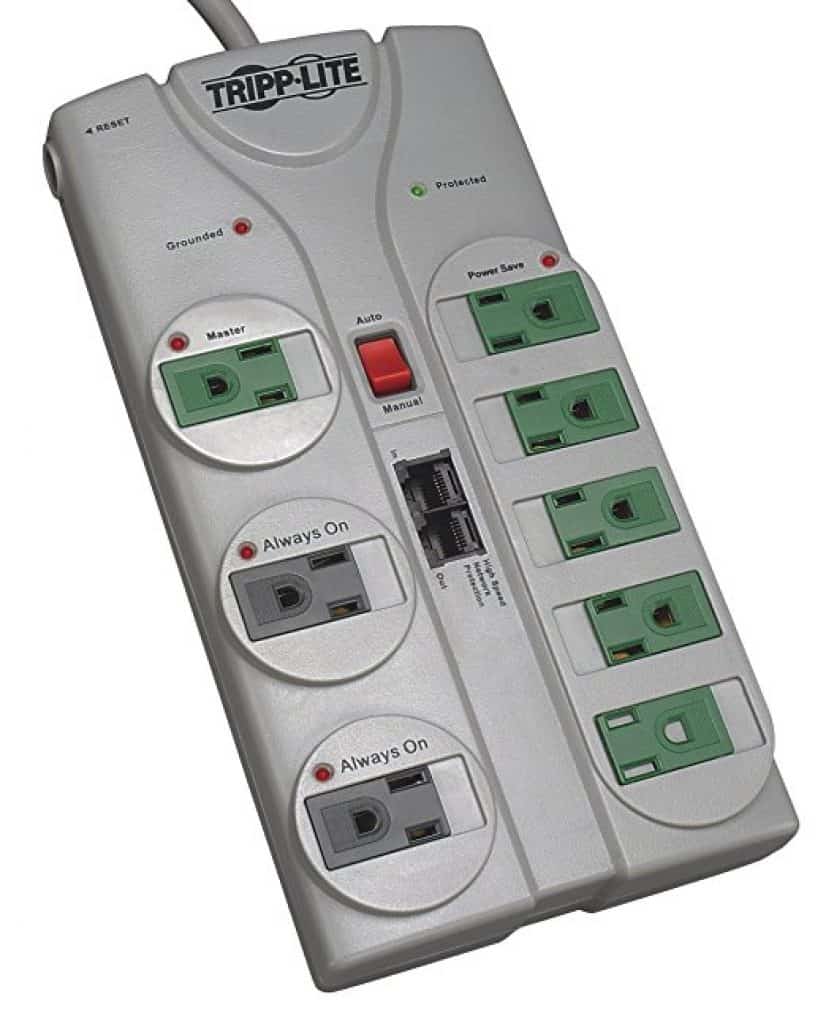
You want strong protection against power surges. A surge protector specializes in blocking voltage spikes before they reach your devices. You get whole-home coverage when you install a surge protector at your main panel. This device handles large surges from lightning and smaller surges from appliances turning on and off. You protect every outlet and device in your home.
A UPS also offers surge protection, but its main strength lies in backup power. The surge protection in a UPS usually covers only the devices plugged into it. You get some defense against power surges, but not the same level of coverage as a whole house surge protector. You should not rely on a UPS alone for full-home surge protection.
-
Surge protector: Shields your entire home from power surges and power spikes.
-
UPS: Protects only the connected devices from surges, with limited capacity.
Note: For the best surge protection, you should use a surge protector at your main panel and a UPS for sensitive electronics.
Power Outage Protection
You face power outages more often in 2026. A surge protector cannot keep your devices running during a blackout. It only blocks voltage spikes. When the power goes out, your devices shut off immediately. A UPS gives you backup power during power outages and sudden power outages. The UPS switches to battery power in milliseconds. You keep working, streaming, or monitoring your security cameras without interruption. In critical settings like healthcare, a UPS can save lives by keeping equipment running during power failures. Data centers trust UPS systems because they deliver power instantly when the grid fails.
Here is a quick look at how UPS systems perform during power outages:
|
Feature |
Description |
|---|---|
|
Outages Recorded |
Over 230,000 outages in the U.S. lasted over an hour from 2018 to 2020 |
|
Critical Role |
UPS systems protect sensitive equipment and save lives in healthcare |
|
Response Time |
UPS delivers power within milliseconds of an outage |
You see that a UPS is essential for power protection when you need to avoid data loss or downtime during power outages.
Coverage: Whole Home vs Individual Devices
You want to know what each device protects. A surge protector covers your entire home. You install it at the main panel, and it guards every circuit and outlet. You do not have to worry about missing a device or forgetting to plug something in.
A UPS protects only the devices you plug into it. You usually connect computers, routers, or entertainment systems to a UPS. You get targeted protection and backup power for your most important electronics. You do not get whole-home coverage with a UPS.
-
Surge protector: Covers every device and appliance in your home.
-
UPS: Covers only selected devices plugged into the unit.
Tip: Use a surge protector for whole-home defense and a UPS for your most valuable electronics.
Cost and Maintenance
You want to balance protection with cost. A surge protector for your whole house usually costs between $150 and $400 for installation, plus the price of the device. You need a licensed electrician for installation. Surge protectors last about 3-5 years. You should replace them after a major power surge or as recommended by the manufacturer.
A UPS costs more per device. You pay for the unit and may need to replace the battery every 3-5 years. You can install a UPS yourself. Maintenance includes checking the battery and making sure the UPS works during power outages. You may need several UPS units if you want to protect multiple devices.
Here is a simple comparison:
|
Feature |
Surge Protector (Whole House) |
UPS (Uninterruptible Power Supply) |
|---|---|---|
|
Coverage |
Entire home |
Individual devices |
|
Surge Protection |
High |
Moderate (for connected devices) |
|
Power Outage |
No backup |
Battery backup during outages |
|
Installation |
Professional |
DIY |
|
Maintenance |
Replace every 3-5 years |
Replace battery every 3-5 years |
|
Cost |
$150-$400 + device |
$50-$300 per unit |
You see that a surge protector gives you broad, affordable protection. A UPS gives you targeted power protection and backup for your most sensitive devices. You can combine both for the best results.
Choosing the Right Protection for Your Home
You want to make smart choices when it comes to protecting your home’s electronics and appliances. Power problems like surges and outages can happen at any time. You need to know how to keep your devices safe and running. Many homeowners ask if they should use a surge protector, a ups, or both. The answer depends on what you want to protect and how you use your devices.
A surge protector acts as your first line of defense. It stops excess voltage from damaging your appliances and electronics. You can avoid expensive repairs and extend the life of your devices by using a surge protector. The National Fire Protection Association reports that electrical fires cause over 51,000 home fires each year. A surge protector helps prevent these risks. You also save money by avoiding repairs that can cost between $1,000 and $10,000. Surge protectors meet safety standards like UL 1449 and NFPA 70, so you know you are following best practices.
A ups does more than just protect against surges. It keeps your devices running during power outages. This is important for computers, routers, and medical equipment. A ups gives you time to save your work and shut down your devices safely. You avoid data loss and hardware damage. Power management matters for every home. Without a surge protector and a ups, you risk losing valuable data and damaging your electronics.
Here is a quick look at the main factors you should consider:
|
Factor |
Description |
|---|---|
|
Safety |
Prevents fires and shocks, per NFPA’s 51,000 fire statistic. |
|
Cost Savings |
Avoids $1,000-$10,000 in repairs, per ElectricianGainesville. |
|
Appliance Protection |
Extends device lifespans by 20-30%, per Fireplaces Direct. |
|
Compliance |
Meets UL 1449 and NFPA 70 standards, per NFPA.org. |
You can see that both a surge protector and a ups play important roles. The next sections will help you match the right solution to your needs.
Home Office and Computer Needs
You rely on your home office and computers for work, school, and communication. You need to protect these devices from surges and outages. A surge protector prevents damage from electrical spikes. A ups keeps your computer, router, and other sensitive electronics running during outages. You avoid losing unsaved work and prevent sudden shutdowns.
Consider these features for your ups:
-
AVR (Automatic Voltage Regulation) corrects voltage changes without draining the battery.
-
Pure sine-wave output protects sensitive electronics from damage.
-
LCD display shows real-time power and battery status.
Power management for your home office starts with a surge protector and a ups. You keep your work safe and your devices running.
Appliances and Entertainment Systems
Your appliances and entertainment systems face risks from surges and outages. A surge protector diverts excess voltage and keeps your devices safe. It absorbs or redirects the surge to the ground. A ups adds backup power and extra surge protection. You protect your TV, gaming console, and sound system from damage and interruptions.
-
Surge protector: Shields appliances and entertainment systems from surges.
-
Ups: Provides backup power and surge protection for your most valuable devices.
You get peace of mind knowing your electronics are safe.
Smart Home and Security Devices
Smart home and security devices need reliable protection. Surges and outages can cause these systems to fail. You should use layered surge protection for the best results.
|
Type of Surge Protection Device |
Description |
Purpose |
|---|---|---|
|
Type 1 SPDs |
Installed where power enters the home, absorbs direct lightning strikes and major external surges. |
First line of defense against surges. |
|
Type 2 SPDs |
Mounted at the main electrical panel, handles external and internal surges. |
Protects against surges that bypass Type 1 devices. |
|
Type 3 SPDs |
Point-of-use protectors like power strips. |
Final layer of defense for sensitive electronics. |
|
Hybrid/Multi-stage Systems |
Combines different types of protection for comprehensive coverage. |
Provides layered defense against various surge threats. |
A ups keeps your security cameras and smart devices running during outages. You maintain safety and control, even when the power goes out.
Installation and Maintenance Tips
You want your surge protectors and UPS systems to work when you need them most. Proper installation and regular maintenance keep your home safe and your devices protected. Many homeowners overlook these steps, but they make a big difference in long-term reliability.
Let’s look at how you can install and care for your power protection devices the right way.
Professional vs DIY Installation
You might feel tempted to install a whole house surge protector yourself. However, you should always hire a licensed electrician for this job. Professional installation ensures the device connects correctly to your main panel, meets local codes, and keeps your warranty valid. Attempting DIY installation can void warranties and even violate electrical codes. For UPS units, you can usually handle setup yourself by following the manufacturer’s instructions. Always connect the UPS directly to a wall outlet, not to another surge protector or UPS, to avoid ground loops and degraded protection.
Tip: Professional installation gives you peace of mind and ensures your surge protector works as intended.
Routine Checks and Replacement
You need to check your surge protectors and UPS systems regularly. Devices wear out over time, especially after major surges. The table below shows how often you should inspect and replace your equipment:
|
Recommendation |
Frequency |
|---|---|
|
Electrical Inspection |
Every 2 to 3 years |
|
Older Homes or Issues |
More often |
Making the Best Choice in 2026
Choosing the right protection for your home in 2026 means understanding how surge and ups devices work together to keep your electronics safe. You face more electrical threats today than ever before. Power surges can happen at any time, and they do not always come from storms. Everyday activities, like turning on large appliances, can cause small surges that slowly damage your devices. You may not notice the effects right away, but over time, these surges can shorten the life of your appliances and electronics. You want to avoid costly repairs and keep your home running smoothly.
You also need to think about what happens when the power goes out. A sudden outage can stop your work, interrupt your entertainment, or even put your security system at risk. An ups steps in to provide backup power, so you do not lose important data or experience downtime. You want to feel confident that your home is protected from both surges and outages. The right combination of surge and ups devices gives you peace of mind and helps you avoid unexpected expenses.
You should not guess when it comes to surge and ups protection. You need to look at your home’s unique needs and make a smart decision. The next sections will help you assess your situation and choose the best solution for your budget and long-term value.
Assessing Your Home’s Needs
You want to start by looking at the risks in your home. Whole-home surge protection is important because power surges happen often. Homes with sensitive electronics, like smart TVs or computers, face a higher risk of damage from surges. Regular surges can wear down your appliances and devices over time.
Ask yourself these questions to decide if you need surge or ups protection:
-
Do you live in an area with frequent storms or power outages?
-
Does your home have expensive electronics or smart systems?
-
Do you work from home and rely on electronic equipment?
-
Have you noticed flickering lights or other electrical issues?
-
Is your home over 20 years old with original wiring?
-
Are you planning major electrical upgrades?
You should also check for a UL 1449 certification when you buy a surge protector. This mark shows that the device meets safety standards and works as promised.
FAQ
You have learned how whole house surge protectors and UPS systems work together to keep your home safe. You now understand the differences between these devices, their benefits, and how to choose the right solution for your needs. You know that protecting your electronics and appliances from surges and outages is more important than ever in 2026. You have seen how a surge protector guards your entire home from voltage spikes, while a UPS keeps your most sensitive devices running during power interruptions. You have also discovered the importance of proper installation, regular maintenance, and making smart choices based on your home’s unique risks.
You may still have questions about how to apply this information to your own situation. Many homeowners want to know more about surge protection, UPS systems, and the best ways to keep their homes safe. You might wonder about compatibility, lifespan, or how to spot warning signs that your protection needs an upgrade. You may also want to know if you can install these devices yourself or if you should call a professional. These are common concerns, and you are not alone in seeking clear answers.
This FAQ section addresses the most frequent questions homeowners ask about whole house surge protectors and UPS systems. You will find straightforward answers that help you make informed decisions. If you want to protect your investment and avoid costly repairs, these answers will guide you. Let’s clear up any confusion and help you feel confident about your home’s electrical safety.
How do I know if my whole house surge protector is working?
You can check the indicator light on the device. A green light usually means the surge protector works. If the light turns off or changes color, you should replace the unit. Always follow the manufacturer’s instructions for your specific model.
Can I use a UPS and a surge protector together?
Yes, you can use both for layered protection. Plug the UPS directly into a wall outlet. Plug your sensitive devices into the UPS. Do not plug a UPS into a surge protector or vice versa. This setup prevents ground loops and ensures proper operation.
How often should I replace my UPS battery?
You should replace the UPS battery every three to five years. Test the battery regularly by unplugging the UPS and checking if your devices stay powered. If the battery fails to hold a charge, replace it immediately to maintain protection.
Do surge protectors and UPS systems protect against lightning strikes?
Whole house surge protectors can reduce damage from indirect lightning strikes. No device can guarantee full protection from a direct strike. You should unplug sensitive electronics during severe storms for the best safety. UPS systems mainly protect against outages and minor surges.